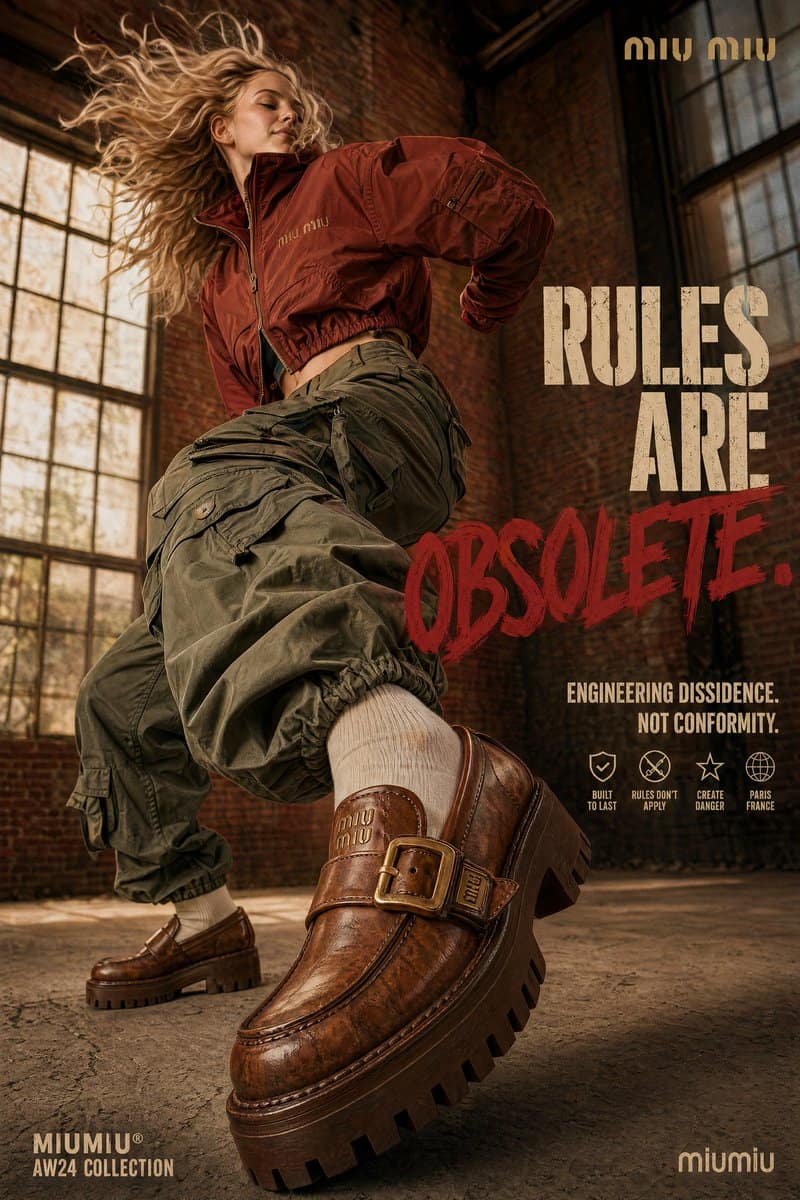
GPT Image 1.5

OpenAI's battle-tested image model tuned for structured, text-heavy visual work — clean typography, layout-aware composition, and reliable on-brand output for UI mockups, slides, infographics, and marketing materials where copy and structure define the result.

3-5s GenerationText to ImageImage to ImageUp to 4K Resolution
0/5000
Model:
Credits required: 1
Sample Artwork 1Sample Artwork 2Sample Artwork 3Sample Artwork 4Sample Artwork 5
INSPIRATION GALLERY

What is GPT Image 1.5?

GPT Image 1.5 is OpenAI's high-speed, highly accurate image model released in December 2025. It generates images 4x faster than its predecessor and offers precise image editing that preserves lighting, composition, and facial likeness across multiple edits. With 90-95% text accuracy, it's the practical choice for marketing assets, UI mockups, and high-volume creative work at a 20% lower API cost.

4x Faster Generation

Wait less, explore more. GPT Image 1.5 renders concepts four times faster than GPT Image 1, allowing your team to generate variants and iterate ideas at the speed of thought.

Precise Edits & Likeness Lock

Change the background, swap a product color, or alter a scene without losing the core subject. It keeps facial likeness, lighting, and composition locked across continuous edits.

95% English Text Accuracy

Stop spell-checking AI outputs. GPT Image 1.5 hits 90-95% accuracy for embedded English text, making it genuinely usable for infographics, UI mockups, and promotional banners.

How to Use GPT Image 1.5

See how GPT Image 1.5's 95% text accuracy, 4x faster generation, and precise editing lock fit into modern marketing and design workflows.

UI mockups & app screens

95% text accuracy · Legible UI copy · Ready-to-present mockups

Design UI Mockups with Real English Text

Stop settling for AI gibberish. With 90-95% text accuracy for English, GPT Image 1.5 renders UI mockups, dashboard concepts, and landing pages with readable buttons, headers, and body copy right out of the generator. No more replacing weird alien letters in Figma.

Try now
UI mockup and app screen design with accurate text

E-commerce & product edits

Precise edits · Likeness lock · Conversational tweaks

Edit Scenes While Locking the Core Subject

Need to move a product from a studio backdrop to a forest, or change a model's jacket color? GPT Image 1.5 allows conversational, precise editing. It locks the facial likeness, lighting, and core composition of your subject while safely swapping the background — zero damage to your original concept.

Try now
Precise editing with subject and likeness lock

Infographics & data visualization

Accurate spelling · Dense text · Visual hierarchy

Produce Text-Heavy Infographics

Turn complex topics into legible visual data. GPT Image 1.5 excels at dense, text-driven layouts, ensuring labels, statistics, and callouts render with correct spelling and visual hierarchy. Spend less time fixing typos in Photoshop and more time shipping content.

Try now
Infographic and data visualization layout

High-volume social & ad assets

4x faster · 20% cheaper API · Batch generation

Generate Ad Variants 4x Faster

Built for the speed of modern marketing. With a 4x faster generation time and 20% lower API costs compared to its predecessor, you can batch-generate hundreds of banner variants, social media posts, and ad creatives without burning through your budget or waiting on slow render queues.

Try now
Batch automation for social media and advertising

Why Creators Choose GPT Image 1.5

When you need to edit images without ruining them, or generate UI mockups and infographics with actual readable text. GPT Image 1.5 is the practical workhorse for marketing teams.

95% English Text Accuracy

Stop dealing with AI gibberish. GPT Image 1.5 correctly spells words in infographics, UI mockups, and advertising banners, reaching 90-95% accuracy for Latin scripts.

Precise Edits, Zero Damage

Want to change the background but keep the product exactly the same? GPT Image 1.5 holds facial likeness, lighting, and composition locked while you edit the rest.

4x Faster Generation

Stop waiting for renders. GPT Image 1.5 produces results four times faster than GPT Image 1, meaning you can test ten concepts in the time it used to take to test two.

Multi-Turn Conversational Edits

You don't need a massive prompt on the first try. Generate an image, then simply chat with the AI to tweak the lighting, add an object, or crop tighter — iteratively.

Multi-Image Batching

Need an entire social media calendar? Generate multiple images in parallel or queue them up while others are still rendering to build massive variations instantly.

20% Cheaper API Cost

Do more with your budget. GPT Image 1.5 reduces input and output costs by 20% compared to its predecessor, making high-volume catalog generation affordable.

Create with GPT Image 1.5 in 3 Simple Steps

Stop wrestling with weird text and corrupted edits. GPT Image 1.5 renders accurate English text 4x faster, letting you chat to edit an image iteratively without losing the original subject.

1

Step 1: Describe Your UI or Scene

Write out the exact English text you want embedded in your infographic, ad banner, or UI mockup. GPT Image 1.5 handles dense text with 90-95% accuracy so you don't have to fix typos in Photoshop.

2

Step 2: Chat to Edit Without Ruining It

Got a great image but want to change the background? Just ask it to swap the backdrop. GPT Image 1.5 holds the facial likeness, lighting, and core composition locked while only touching what you asked to change.

3

Step 3: Export or Batch Generate

4x faster generation means you don't have to wait. Start generating variants in parallel. With a 20% cheaper API cost, you can generate an entire calendar of social content in minutes.

What the Community Says About GPT Image 1.5

Social media managers, advertisers, and product teams share how the speed and text accuracy changed their workflow.

"The new editing tool is incredible. Before, if I asked AI to change a background, it would accidentally change the person's face too. GPT Image 1.5 locks the face and lighting perfectly while swapping the rest of the scene."

Ryan Torres
Ryan Torres
Social Media Manager

"Finally, I don't have to fix spelling mistakes in Photoshop anymore. The 95% text accuracy means I can generate a full advertising banner with a headline and a call-to-action, and the English text actually reads correctly on the first try."

Lena Müller
Lena Müller
Head of Brand

"It's seriously fast. We produce social content at high volume, and getting results four times faster combined with the 20% cost drop means we can finally afford to batch-generate hundreds of localized variants for our campaigns."

Kevin Park
Kevin Park
Performance Marketer

Frequently Asked Questions

Got questions? We've got answers.